🔥 Special Launch Price — $17 One-Time No Monthly Fees. Ever.
The AI Tool Built Specifically for Teachers & Educators

This AI Generates Your Quizzes &
Publishes Them to
Google Forms
Automatically in 60 Seconds.

Save hours of work creating quizzes and lesson plans — MyLesson AI generates everything and publishes it directly to Google Forms with one click. No manual entry. No copy-pasting. Just done.

🚀 Yes! Give Me Instant Access — $17 →
✅ No tech skills needed  |  ✅ Works in any language  |  ✅ Publishes to Google Forms instantly  |  ✅ 30-Day Money-Back Guarantee
60s
To Generate a Quiz
20+
Languages Supported
500+
Quizzes Per Credit Pack
0
Monthly Fees

Watch MyLesson AI Create a Complete
Quiz & Publish to Google Forms Live

From typing your topic to a fully published Google Form — in under 60 seconds. Real demo, no edits.

Are You Still Doing This The Hard Way?

Every teacher knows the pain. You spend your evenings creating content that should take minutes. Here's what's really happening...

Wasting Hours Every Week

Manually creating quiz questions, typing out options A, B, C, D, marking correct answers — one by one. By the time you're done, your weekend is gone.

📋

Google Forms Takes FOREVER

Adding questions one by one, selecting question type, typing each option, marking the correct answer — then repeating 20 more times. It's exhausting and soul-crushing.

📚

Lesson Plans Are Even Worse

Learning objectives, teaching aids, misconceptions, activities, homework — every single period. Teachers spend more time planning than actually teaching.

🌍

Language Barriers

Teaching in Hindi, Tamil, Spanish, or French? Finding quality educational content in your language is almost impossible. You end up doing it all yourself.

😩

Burnout Is Real

Teachers are leaving the profession at record rates. The administrative burden is crushing creativity and killing passion. You didn't become a teacher to spend hours on paperwork.

💸

Paying for Tools That Don't Help

You've tried generic AI tools that give you random results. They don't understand education. They don't publish to Google Forms. You still have to do everything manually.

💡

What If You Could Create a Complete, Ready-to-Use Quiz AND Publish It to Google Forms…
In Under 60 Seconds?

That's not a dream. That's exactly what MyLesson AI does — every single time you click "Generate."

Google Forms in Seconds.
Not Hours.

Creating a Google Form manually is one of the most time-consuming tasks a teacher faces. MyLesson AI eliminates it completely.

❌ Before
2–3 hrs
Creating manually, one question at a time
✅ With MyLesson AI
< 60s
AI generates & publishes instantly
How It Works
1

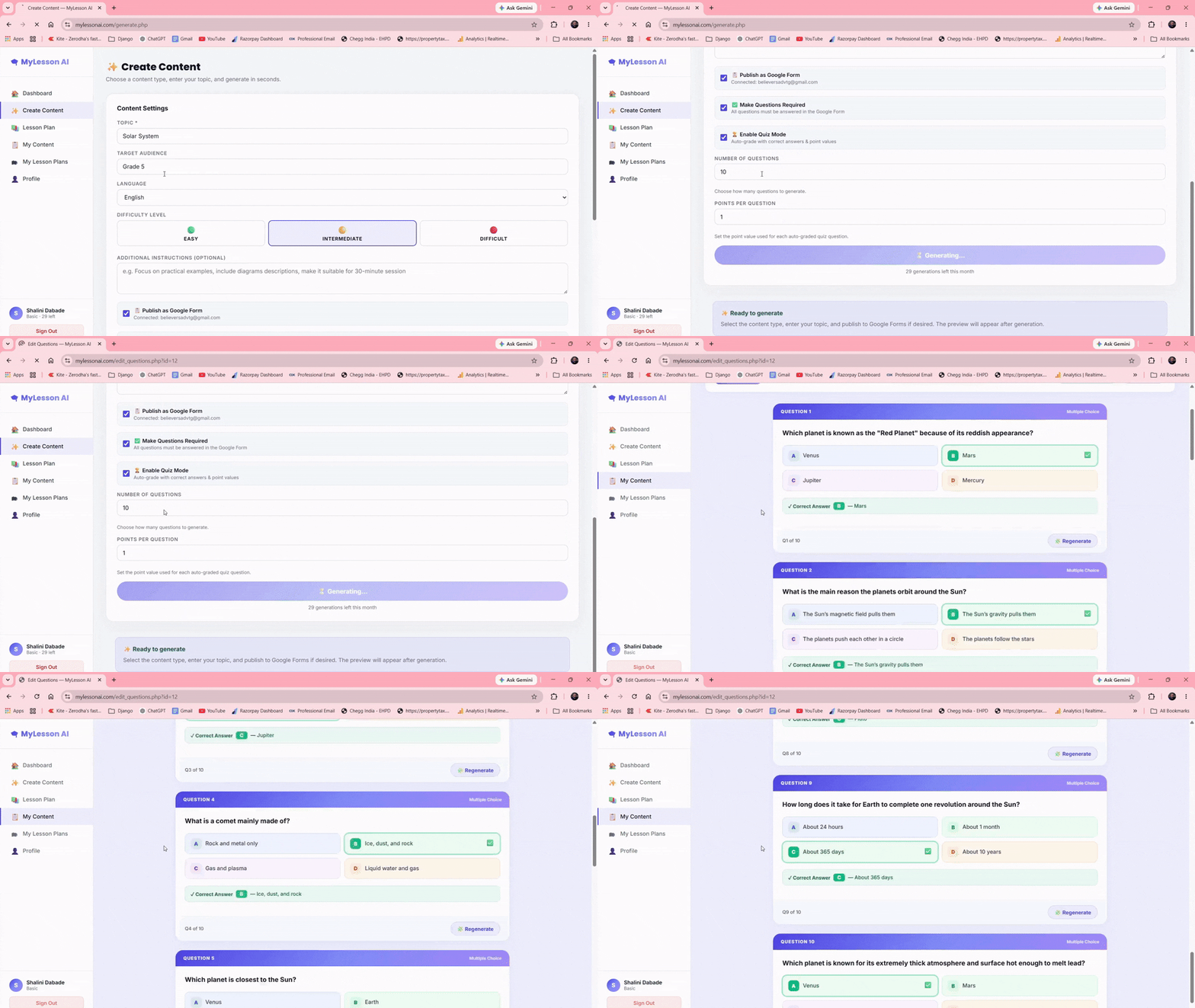
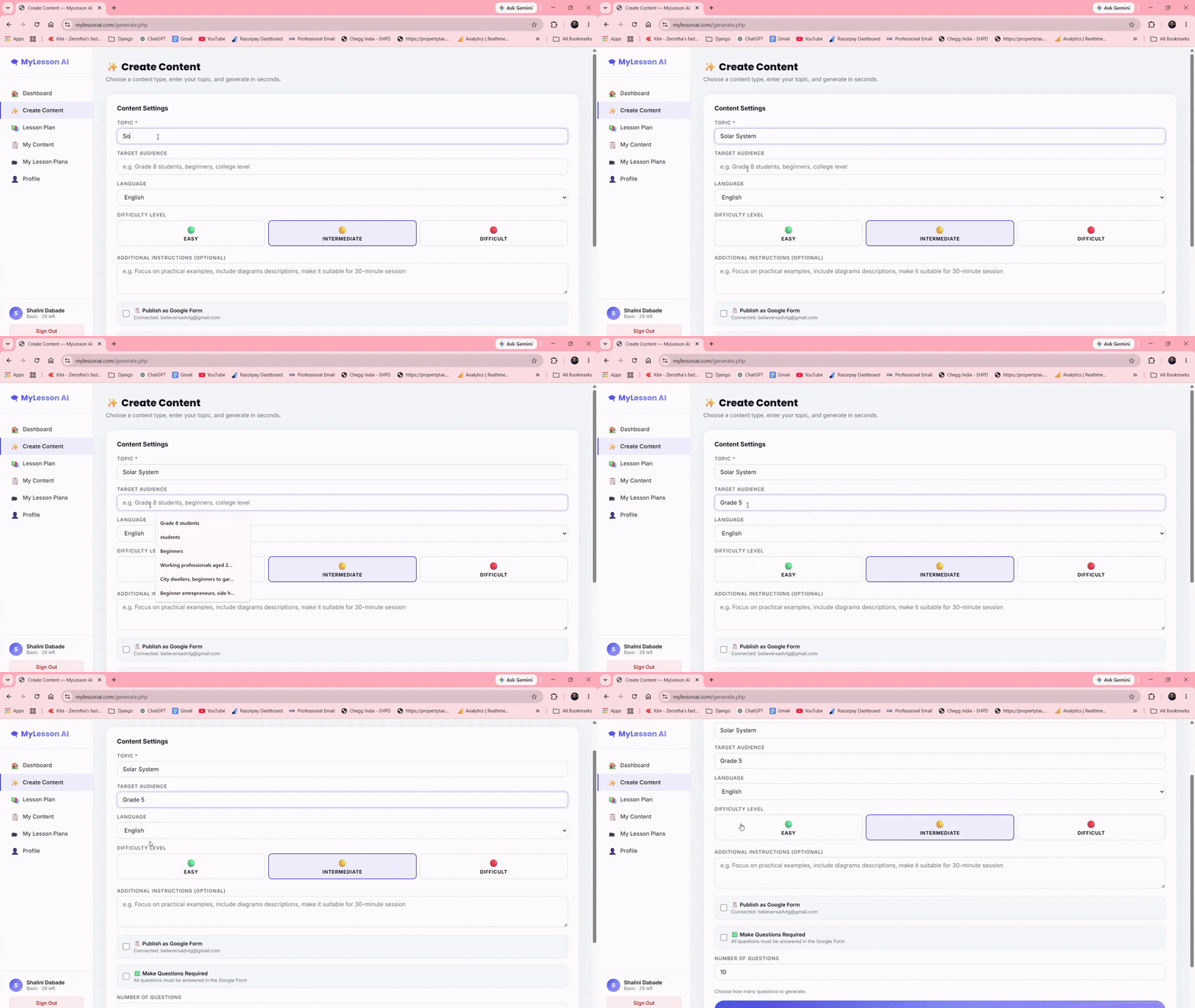
Type your topic — "Photosynthesis for Grade 8" or "Python Basics"

2

Choose your settings — difficulty, language, number of questions

3

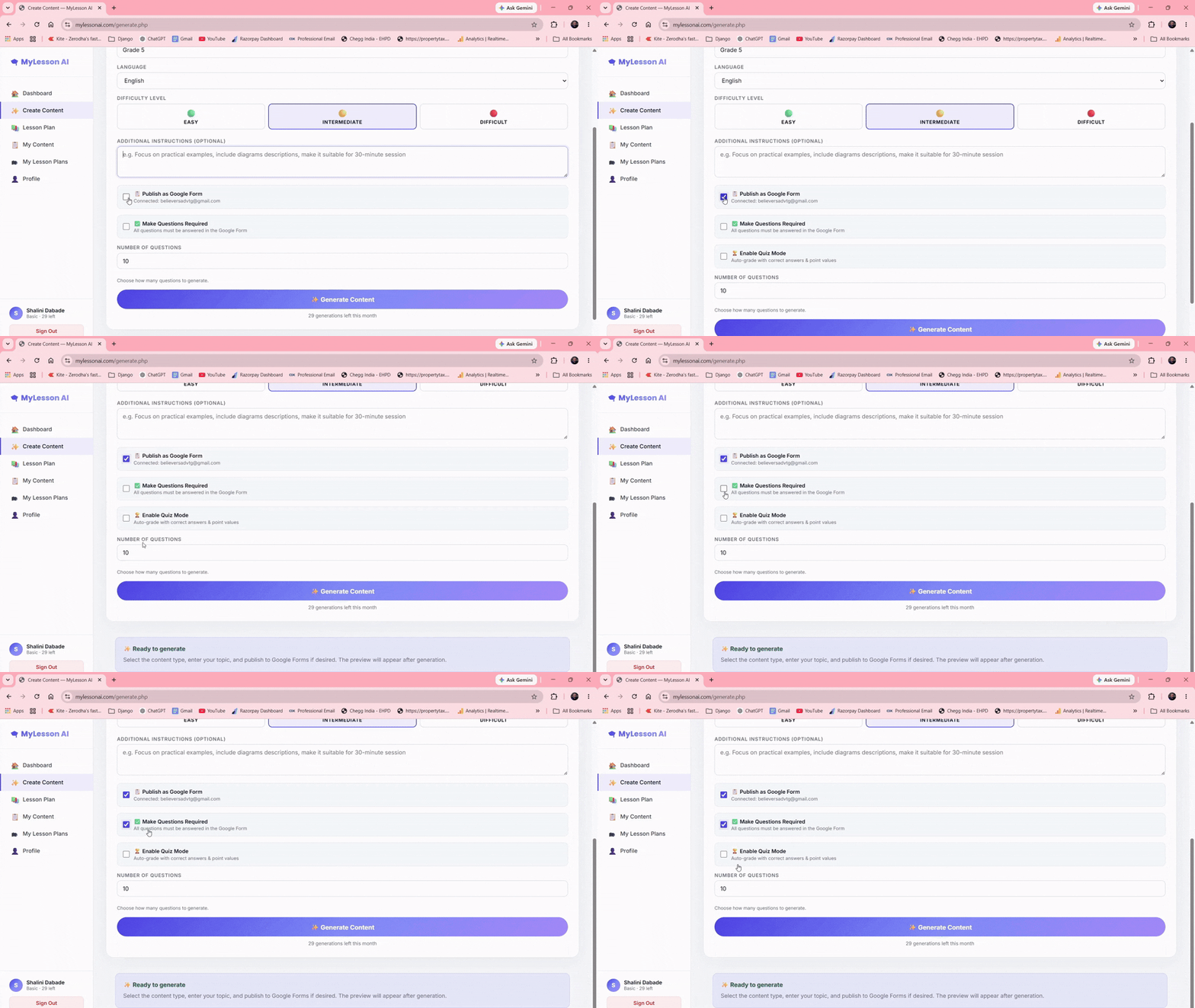
Tick "Publish to Google Forms" — one checkbox does it all

4

Click Generate — AI creates the quiz AND publishes to Google Forms simultaneously

5

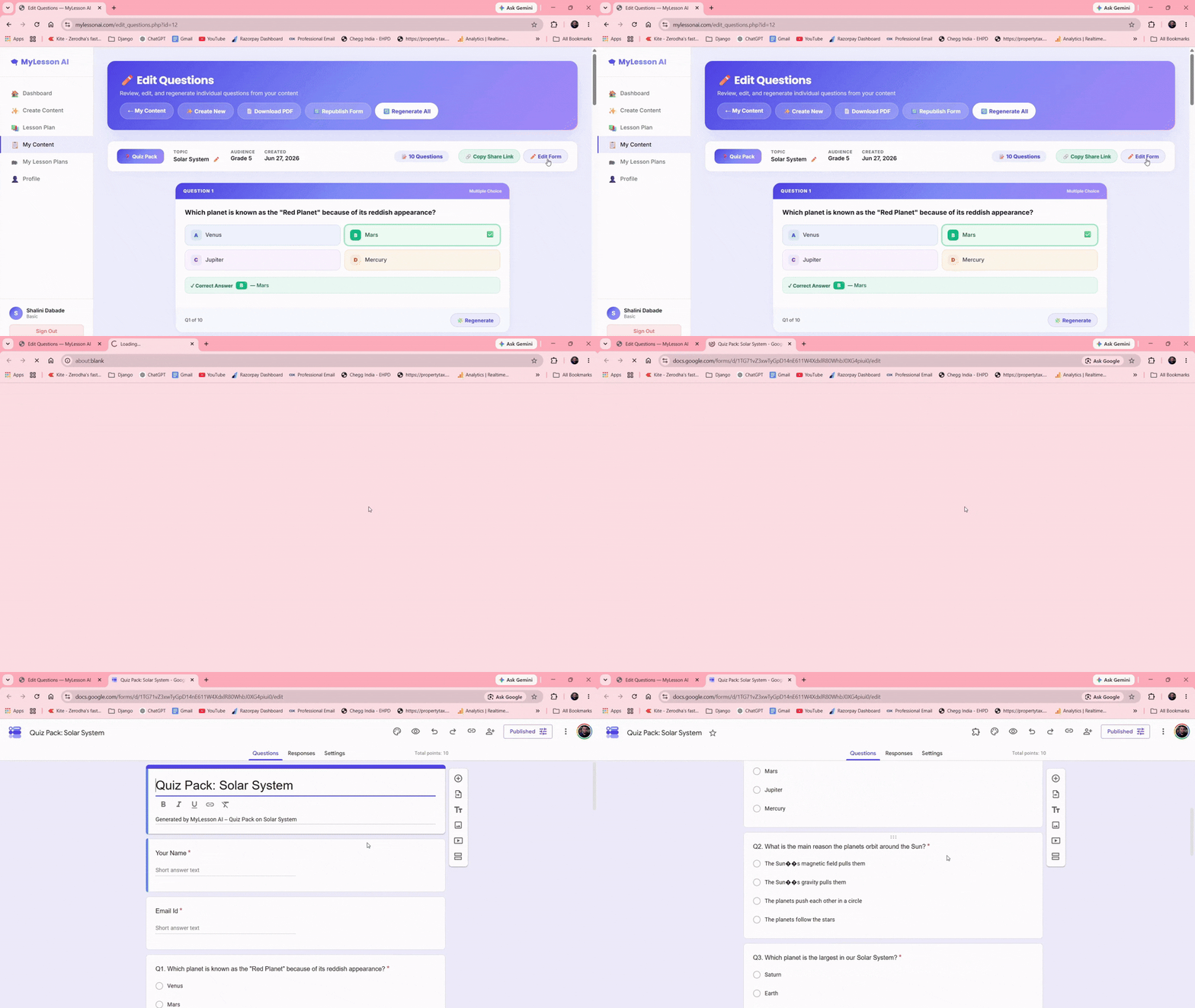
Share the link — your students can take the quiz immediately. Done.

Complete Lesson Plans
in Under 2 Minutes.

Every period fully planned — learning objectives, outcomes, common misconceptions, ice breakers, teaching aids, homework — automatically generated and structured.

Multiple periods in one click — generate 1 to 8 periods at once with full detail

Regenerate any section — don't like the ice breaker? Click ↻ and get a new one instantly

Exit ticket Google Form — automatically create a student feedback form for every lesson

Download as PDF — print-ready lesson plans for your files

1
Period 1 — Introduction to Photosynthesis
✅ Learning Objectives
Understand what photosynthesis is
Identify inputs and outputs
Explain the role of chlorophyll
🎓 Learning Outcomes
Students describe the process
Students draw a diagram
Students explain to peers
⚠️ Misconceptions
Plants get food from soil
Photosynthesis happens at night
▶️ Ice Breaker (5 min)
Show a plant in a dark room and ask why it's dying

Everything a Teacher Needs.
Nothing They Don't.

Core Feature

AI Quiz Pack Generator

Generate 5–50 MCQ questions on any topic, any difficulty level, in any language. Each question includes 4 options with the correct answer highlighted.

🔥 Most Popular
📋

One-Click Google Forms Publishing

The feature that saves teachers hours every single week. Click one checkbox and your quiz is live on Google Forms — complete with correct answers in quiz mode.

Included
📚

AI Lesson Plan Designer

Complete multi-period lesson plans with objectives, outcomes, misconceptions, ice breakers, teaching aids, homework and multiple intelligence mapping.

Smart Feature
🔄

AJAX Question Regeneration

Don't like a question? Click ↻ to regenerate just that one — no page reload, no waiting, no losing all your other questions. Instant replacement.

20+ Languages
🌐

Multi-Language Support

Generate content in Hindi, Tamil, Telugu, Spanish, French, Arabic, Mandarin and 14 more languages. Teach in your language, reach your students directly.

Included
🎯

Difficulty Level Control

Choose Easy, Intermediate or Difficult. The AI calibrates question complexity, vocabulary and analytical depth perfectly for your students' level.

From Idea to Published Google Form
in Under 60 Seconds

✍️
Step 1

Type Your Topic

Enter any topic — "World War II for Grade 10", "Python Programming Basics", "Photosynthesis for Grade 8". Add your target audience and choose your language. That's all the input required.

Step 1 demo
Step 2 demo
⚙️
Step 2

Set Your Preferences

Choose difficulty (Easy / Intermediate / Difficult), number of questions (5 to 50), and whether to enable Quiz Mode for auto-grading. Tick "Publish to Google Forms" if you want instant publishing.

🤖
Step 3

AI Generates Everything

Our AI creates complete, curriculum-quality questions with 4 options each, marks correct answers, and simultaneously publishes everything to Google Forms — all in under 60 seconds.

Step 3 demo
Step 4 demo
📋
Step 4

Publish to Google Forms

Your quiz is instantly published to Google Forms — auto-graded, ready to share. Copy the link and send it to students via WhatsApp, email, or your LMS. Responses appear in real-time in Google Sheets.

MyLesson AI vs. Doing It Manually

Task Without MyLesson AI With MyLesson AI
Create 20-question quiz ❌ 60–90 minutes ✅ Under 60 seconds
Publish to Google Forms ❌ 2–3 hours manually ✅ 1 checkbox click
Create full lesson plan ❌ Hours per lesson ✅ Under 2 minutes
Multiple languages ❌ Not possible easily ✅ 20+ languages
Regenerate single question ❌ Retype everything ✅ One click
Exit ticket forms ❌ Build manually ✅ Auto-generated
Download as PDF ❌ Manual formatting ✅ One click
Monthly subscription cost ❌ Other tools charge monthly ✅ One-time $17 forever

One Price. Everything Included.
Yours Forever.

One-time purchase. No monthly fees. No subscriptions. No limits on what you can create.

Full Access — One-Time
$17 one-time

Everything included. Pay once, use forever.

  • Unlimited quiz & lesson plan generations
  • Quiz Pack Generator (5–50 questions)
  • AI Lesson Plan Designer (up to 8 periods)
  • One-Click Google Forms Publishing
  • 20+ Languages supported
  • 100,000 free word credits included
  • Add your own OpenAI key for unlimited use
  • AJAX question regeneration
  • Download as PDF
  • Email support
  • All future updates included
🚀 Get Instant Access Now — $17 →
Add to Cart
🛡️ 30-Day Money-Back Guarantee. If MyLesson AI doesn't save you hours every week, email us within 30 days for a full refund. No questions asked.
Affiliates earn 80% commission on every sale. Apply to promote →

Everything You Need to Know

Do I need an OpenAI API key to get started? +
No! Every account comes with 100,000 free word credits — enough to generate hundreds of quizzes and lesson plans without any API key. Once your free credits are used, you can add your own OpenAI API key for continued generation at less than a cent per quiz.
How does the Google Forms publishing work? +
Simply connect your Google account once (takes 30 seconds). After that, every time you generate a quiz, just tick the "Publish as Google Form" checkbox. MyLesson AI will automatically create the form, add all questions and options, and give you a shareable link — all in the same 60 seconds it takes to generate the quiz.
What languages are supported? +
Currently 20+ languages including English, Hindi, Tamil, Telugu, Gujarati, Kannada, Malayalam, Punjabi, Marathi, Odia, Bengali, Urdu, Spanish, French, German, Arabic, Portuguese, Mandarin Chinese, Japanese, and Swahili. More being added regularly.
Can I edit the questions after they're generated? +
Yes! Every question is fully editable. You can also click the ↻ button next to any question to regenerate just that one — without affecting the rest. The same applies to every section of your lesson plan.
Is this a monthly subscription? +
No — MyLesson AI is a one-time purchase of $17. Pay once, use forever. There are no monthly fees, no renewal charges, and no hidden costs. The only ongoing cost is your own OpenAI API key if you use more than your free credits (approximately $0.001 per quiz).
What subjects and grade levels does it support? +
Every subject and every grade level. Science, Mathematics, English, History, Geography, Programming, Languages — anything you can type as a topic, MyLesson AI can create content for. From Grade 1 to University level.
Is there a money-back guarantee? +
Absolutely. We offer a full 30-day money-back guarantee. If MyLesson AI doesn't save you significant time every week, simply email us within 30 days for a complete refund — no questions asked, no hoops to jump through.
Stop Spending Your Evenings
Creating Quizzes & Forms Manually.

MyLesson AI is ready to use in minutes. Your first quiz is generated and published to Google Forms in under 60 seconds — guaranteed.

⏰ Launch Price Expires In
🚀 Get Instant Access Now — $17 →
🛡️ 30-Day Money-Back Guarantee  |  ✅ Instant Access  |  🔒 Secure Checkout via WarriorPlus
🚀 Get Access — $17 →